

Short answer: there are four ways to get PropSpace listings onto a WordPress site: retype them by hand, import the portal XML feed, pay for a custom API build, or install a plugin that reads the PropSpace Website API directly. For an agency that wants listings to update and come down on their own, the API route is the only one that stays accurate without someone watching it.
If your brokerage runs on PropSpace, you have probably seen this. A unit sells on Tuesday, comes off Property Finder the same day, and is still on your own website the following week. A buyer calls about it. Your agent has to explain. This guide walks through each option, what it costs you in time and accuracy, and how to pick one.
Why doesn’t PropSpace update my website automatically?
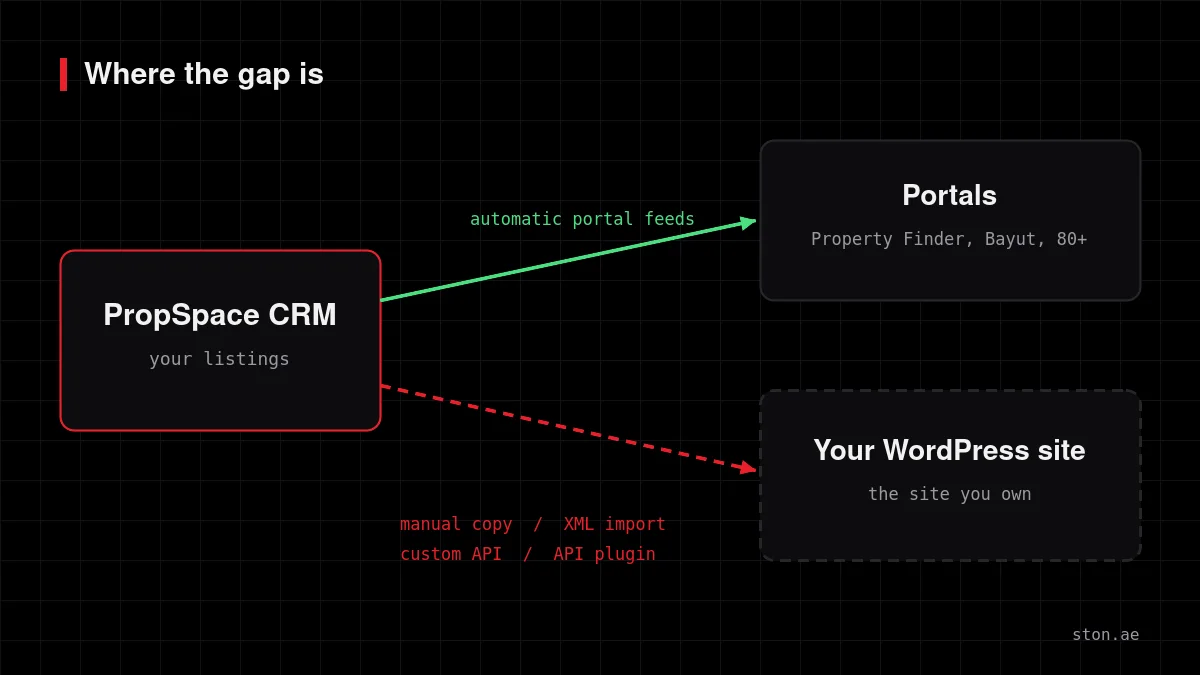
PropSpace is built to push listings to portals, and it does that well. Your own website is a different kind of destination. Portals receive a feed in a format they defined; your WordPress site has its own theme, its own fields and its own idea of what a “property” is. Something has to translate between the two, and by default nothing does.
So most agencies fill the gap with people. A coordinator copies new listings across, edits prices when they change, and is supposed to remember to unpublish sold units. That works at 30 listings. At 300 it quietly stops working.
What are the options for showing PropSpace listings on WordPress?
| Method | How it works | Keeps prices current | Removes sold listings | Main risk |
|---|---|---|---|---|
| Manual entry | Staff retype each property in WordPress | Only if someone remembers | Only if someone remembers | Drift grows with the catalogue |
| XML feed + importer | A generic importer (for example WP All Import) reads the portal feed on a schedule | Yes, on each run | Depends on how you configure deletes | Missing fields, empty galleries, duplicates after a failed run |
| Custom API build | A developer writes a one-off integration for your site | Yes | Yes | You own the code and every future fix |
| API plugin | A ready-made plugin reads the PropSpace Website API | Yes | Yes, only when PropSpace confirms removal | You depend on the plugin being maintained |
1. Manual entry
Free to start and fine for a handful of off-plan projects. The cost is not the first upload; it is every price change, every new photo and every sold unit after that, forever. It also tends to be the task that gets skipped in a busy week.
2. Importing the PropSpace XML feed
PropSpace can generate XML feeds for portals, and general-purpose importers can read them. This is the most common DIY route. It works, with three catches worth knowing before you build on it:
- The feed is shaped for portals, not websites. It carries what a portal needs to publish an advert. Fields a website wants, such as structured agent contact details or a last-updated timestamp, may be missing or flattened into text.
- Photos often fail silently. PropSpace serves images from URLs that do not end in a normal file extension. WordPress checks file types before accepting a download, so a naive importer can report success while every gallery stays empty. We wrote up why property galleries fail to import on our product page.
- Interrupted runs can duplicate listings. If a long import times out halfway on shared hosting, the next run may create a second copy of properties it already added.
3. A custom integration against the PropSpace API
PropSpace publishes documentation for a Website API that lets your own site read live listing data. It is read-only: listings are still created and edited in PropSpace, and your website only displays them. A developer can build directly against it. The result is usually good. The catch is ownership: every WordPress update, PHP upgrade or API change becomes a maintenance job you pay for separately.
4. A plugin that reads the API for you
This is the custom integration, packaged and maintained as a product. You enter your API credentials, map nothing by hand, and set a schedule. This is the route we took with PropSpace Importer Pro, and the rest of this guide uses it as the worked example.
API or XML feed: which should you use?
If all you need is a simple list of properties with a photo and a price, a well-configured feed import can be enough. If you want any of the following, use the API:
- An agent directory where each listing shows the right agent’s mobile and email
- A map built from real coordinates rather than a guessed address
- Filters by property type and sale or rent that work like real categories
- Galleries in the same order you set in PropSpace
- Sold or withdrawn units disappearing from the site without anyone touching WordPress
The API returns the full record and a real error when something is wrong. A feed is a file that can be cached, delayed or reshaped without notice.
How to set up an automatic PropSpace to WordPress sync
- Get your API access from PropSpace. Ask your PropSpace account contact for Website API credentials for your company.
- Install the plugin on your WordPress site. It works with any theme, including Hello Elementor, and does not need a dedicated server.
- Add your credentials. They are encrypted before they are stored in the database.
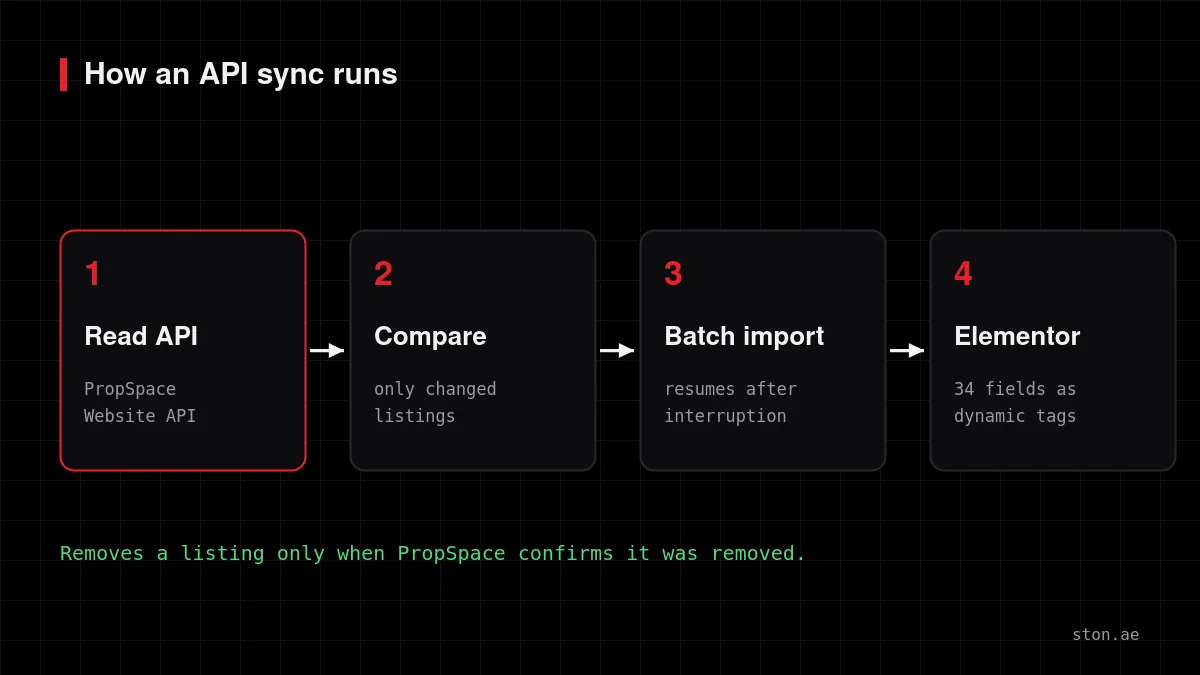
- Run the first import. Large catalogues are processed in small batches, so an ordinary shared hosting plan does not time out. If a run is interrupted, the next one continues where it stopped.
- Design your property template in Elementor. Each of the 34 imported fields is available as a dynamic tag, and property type and offering type are real taxonomies, so Loop Grid filters and archive pages work without custom code.
- Set the schedule. After the first import, each run only touches listings that changed. A price drop updates one post; the other few hundred are left alone.
What gets imported?
- Reference number, price and the date the price last changed
- Bedrooms, bathrooms, built-up area and plot size
- Sale or rent, furnished status and featured flag
- Location, region, community and sub-community, plus map coordinates
- The full photo gallery in PropSpace’s order
- Agent name, photo, mobile and email
- Amenities and private features
- PropSpace listing ID, client ID and created/updated timestamps
The full field list and data model are on the technical documentation page.
What an import should never do
The worst failure for a property website is not a slow sync. It is a sync that deletes good listings because a request failed. A safe importer only removes a property from your site when PropSpace confirms it was removed, never because a run timed out or returned nothing. It also leaves your manual choices alone, for example a cover photo your marketing team picked by hand. Ask any vendor or developer how their import behaves on a failed run before you install it.
Limits worth knowing
- The PropSpace Website API is read-only. You still create and edit listings in PropSpace; the website follows.
- Locations are stored as text rather than a taxonomy, because a live Dubai catalogue produces thousands of unique sub-communities.
- Your site still needs a property template. The plugin brings the data; the design is yours, or ours if you hire us to build the site.
Independent plugin, not affiliated with or endorsed by PropSpace.
FAQ
Does PropSpace have a WordPress plugin?
PropSpace documents a Website API that any site can read. PropSpace Importer Pro is an independent WordPress plugin built on that API; it is not made by PropSpace.
Will it work with my real estate theme?
Yes. It stores listings as a normal WordPress post type with standard post meta, so it works with any theme. On Elementor you build the listing template with dynamic tags.
Do I need a VPS or dedicated server?
No. The import runs in small batches and resumes after interruptions, which is what keeps it within shared hosting limits.
How often do listings update?
On the schedule you set. Each run only updates listings that changed since the last one.
Can I try it on my own listings first?
Yes. Send us a message from the product page and we will show it running against your PropSpace account.